
Quick answer
What is the difference between FIFO and LIFO stock profit?
FIFO assigns the oldest remaining purchase shares to the sale first. LIFO assigns the newest remaining purchase shares first. The calculator allocates both purchase value and Buy commission proportionally from the selected lots.
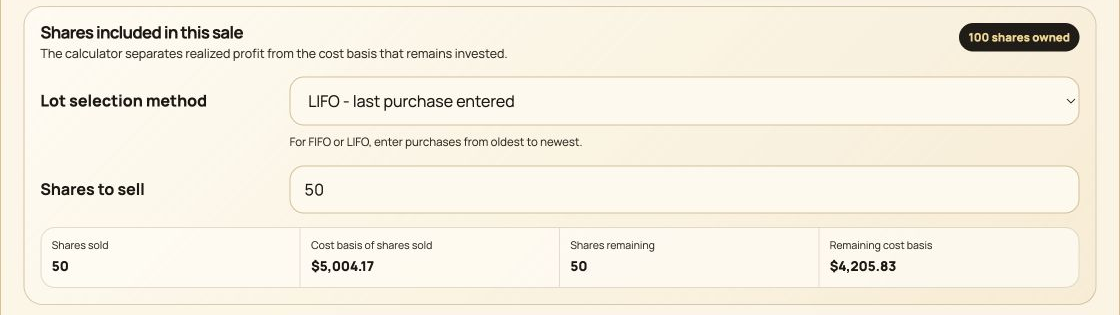
- 1
Select the allocation method. LIFO assigns shares from the most recently entered purchase first.
- 2
Set the partial sale. This scenario sells 50 of the 100 shares owned.
- 3
Verify basis conservation. LIFO assigns $5,004.17 to Shares sold and leaves $4,205.83 with the remaining shares.
Two-lot partial sale
The same sale produces $2,490 with FIFO and $490 with LIFO
Buy 50 shares at $80 and later buy 50 shares at $120. Sell 50 shares at $130 and pay a $10 Sell commission. No Buy commissions or dividends are included.
Calculate the sale
50 x $130 - $10 = $6,490.
Use the oldest lot
50 x $80 = $4,000.
Subtract oldest basis
$6,490 - $4,000 = $2,490.
Use the newest lot
50 x $120 = $6,000.
Subtract newest basis
$6,490 - $6,000 = $490.
Keep the unsold lot
The unused $4,000 or $6,000 basis remains with the 50 unsold shares.
Allocation comparison
A $2,000 profit difference comes from cost basis
FIFO assigns the $80 shares and reports 62.25% ROI. LIFO assigns the $120 shares and reports 8.17% ROI. Net proceeds are $6,490 in both cases.
- Net proceeds
- $6,490.00
- FIFO basis
- $4,000.00
- FIFO profit
- $2,490.00
- LIFO basis
- $6,000.00
- LIFO profit
- $490.00
Conservation
The unselected cost basis stays with the unsold shares
A partial sale does not apply the full position cost to the realized result.
After the FIFO sale, the newer 50-share lot remains with $6,000 of basis. After the LIFO sale, the older lot remains with $4,000 of basis. In both cases, Shares sold plus Shares remaining still equal the original 100 shares.
The partial stock sale guide explains this conservation rule for commissions and more than two lots.
Explicit selection
Specific lots are entered, not inferred
Specific-lot mode is useful when the modeled sale should draw a stated number of shares from particular purchase entries.
Manual quantities
Enter the allowed share quantity for each lot instead of asking the calculator to choose a preference.
Purchase order
For shares-to-sell planning, the displayed purchase order defines the sequence within the entered limits.
No tax recommendation
The calculator reports mathematical outcomes and does not decide which identification method should be used for tax reporting.
Record check
Compare the modeled lots with brokerage confirmations and basis records before relying on a completed-sale result.
Methodology and references
Separate calculator allocation from tax-lot reporting
This page explains the calculator's mathematical FIFO, LIFO, and Specific-lot models. It does not determine the permitted tax treatment of a brokerage transaction.
Ready to compare FIFO and LIFO sale results?
Use the Stock Profit Calculator