
Quick answer
What is the partial stock sale profit formula?
First calculate Net proceeds from the shares sold. Then subtract only the Cost basis of shares sold, not the cost basis of the entire position.
Cost basis of shares sold includes the purchase value assigned to those shares and the proportional buy commission. The calculator leaves the unsold portion in Remaining cost basis.
Calculator walkthrough
How to enter a partial stock sale
Open the stock profit calculator, enter the position exactly as it was purchased, and then define the shares included in the sale.
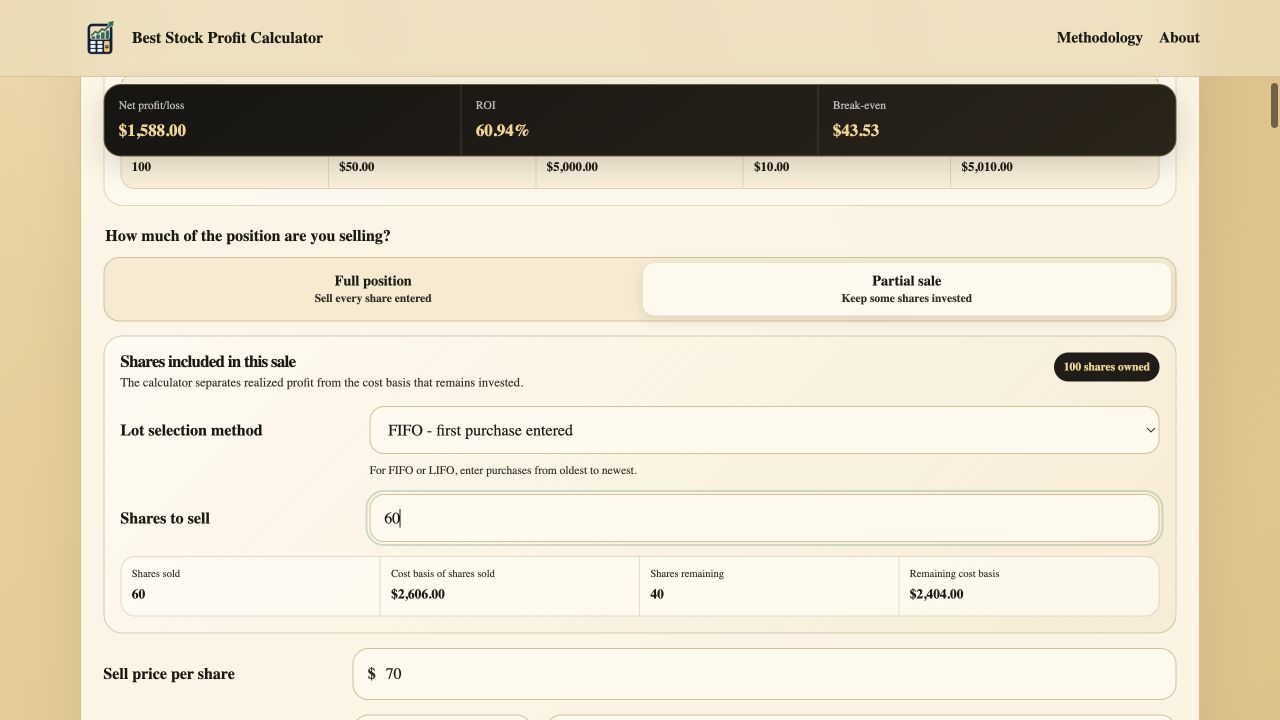
Choose Partial sale. The calculator will separate the sold shares from the shares that remain invested.
Select the purchase lots. For multiple purchases, choose FIFO, LIFO, or Specific lots.
Enter Shares to sell. The quantity must be smaller than the Total shares owned.
Review the allocation. Confirm Cost basis of shares sold, Shares remaining, and Remaining cost basis before adding the sale price and fee.
One purchase example
Calculate profit when part of one purchase is sold
Suppose you own 100 shares bought at $50 and paid a $10 buy commission. You sell 40 shares at $65 and pay a $5 sell commission. Because all shares came from the same purchase, 40% of the original purchase value and buy commission belongs to the sale.
Allocate the share cost
40 shares x $50 = $2,000
Allocate the fee
$10 x 40 / 100 = $4
Add cost and fee
$2,000 + $4 = $2,004
Subtract the sale fee
(40 x $65) - $5 = $2,595
Compare proceeds with basis
$2,595 - $2,004 = $591
Keep the unsold cost separate
$5,010 - $2,004 = $3,006
Complete result
Realized profit is $591 and ROI is 29.49%
The ROI denominator is the $2,004 Cost basis of shares sold. The remaining 60 shares and $3,006 of cost basis are not included in realized profit from this sale.
- Shares sold
- 40
- Cost basis of shares sold
- $2,004
- Net proceeds
- $2,595
- Net profit
- $591
- ROI
- $591 / $2,004 = 29.49%
- Shares remaining
- 60
- Remaining cost basis
- $3,006
Multiple purchase example
Calculate a partial sale across multiple stock purchases
Now assume 50 shares were bought at $40 with a $5 commission, followed by 50 shares at $60 with another $5 commission. You sell 60 shares at $70 and pay a $6 sell commission. The result changes depending on which purchase lots supply those shares.
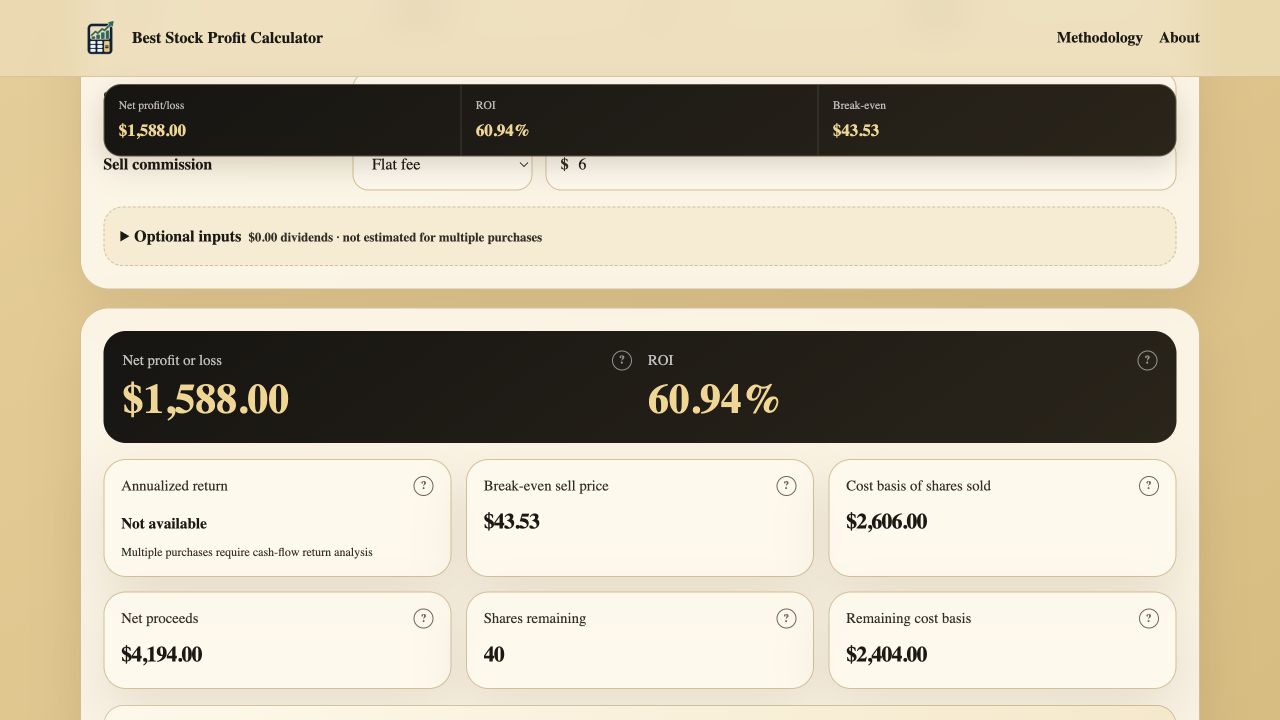
Realized result. FIFO produces $1,588 in Net profit and 60.94% ROI.
Cost basis sold. The 60 shares carry $2,606 in purchase cost and allocated buy commissions.
Position remaining. The unsold 40 shares remain visible instead of disappearing from the calculation.
Remaining cost basis. The second lot retains $2,404 in basis for a later sale.
Cost basis selection
FIFO vs LIFO vs specific lots
Purchase-lot selection does not change the sale proceeds. It changes the cost basis assigned to the shares sold, which can change calculated profit, ROI, and the cost basis left in the position.
FIFO
The first purchase entered supplies shares first. Enter purchases from oldest to newest so the order matches first-in, first-out treatment.
LIFO
The last purchase entered supplies shares first. In the example, LIFO assigns $3,406 of basis and produces $788 in profit, or 23.14% ROI.
Specific lots
Enter the exact number of shares sold from each purchase. Use this when your broker confirmation identifies the lots included in the transaction.
Why no average-cost option?
Average basis is not generally available for individual stocks under U.S. tax rules, except in limited categories such as certain mutual funds and dividend reinvestment plans.
Choosing LIFO in this calculator models a sale from the newest entries. It does not itself identify shares with a broker or establish the method accepted for a tax return.
| Lot method | Shares sold from lots | Cost basis of shares sold | Net proceeds | Net profit or loss | ROI |
|---|---|---|---|---|---|
| FIFO | 50 from lot 1, 10 from lot 2 | $2,606 | $4,194 | $1,588 | 60.94% |
| LIFO | 50 from lot 2, 10 from lot 1 | $3,406 | $4,194 | $788 | 23.14% |
| Specific lots | Chosen manually | Depends on entered shares | $4,194 | Depends on selected basis | Depends on selected basis |
Planning a partial exit
Find a target sell price for only the shares being sold
Partial sale also works with Find required sell price. The calculator uses Shares sold and Cost basis of shares sold to solve for a price that reaches the entered target profit or ROI. Shares remaining do not inflate the target calculation.
When Previous sales have been entered, the target calculation starts with the shares and cost basis remaining after those completed transactions. It solves for the current modeled sale only; cumulative realized profit from earlier sales remains in Position sale history.
Calculation scope
This is a profit estimate, not a tax calculation
Included
Shares sold, execution prices, allocated purchase costs, proportional buy commissions, sell commission, dividends, realized ROI, and remaining cost basis.
Not included
Capital gains tax rates, wash-sale adjustments, stock split tax treatment beyond the calculator's direct ratio adjustment, return of capital, inherited or gifted basis, currency conversion, slippage, and broker-specific rounding.
Specific identification
U.S. guidance generally requires timely identification of the shares with the broker and written confirmation. A calculator selection is not a substitute for that record.
FIFO fallback
IRS guidance states that when shares bought at different times cannot be adequately identified, the basis of the earliest acquired shares is used first.
Before relying on the estimate
Common partial stock sale mistakes
Using the entire position basis
Subtract only the basis assigned to shares sold. Including unsold shares understates realized profit.
Ignoring the buy commission allocation
A buy-side flat fee belongs partly to sold shares and partly to remaining shares. The calculator allocates it by share quantity within each purchase.
Entering purchases in the wrong order
FIFO and LIFO use the displayed purchase order. Enter lots from oldest to newest before selecting either method.
Comparing unrealized and realized profit
This result describes the modeled sale. It does not include the current unrealized gain or loss on shares remaining.
Combining previous and current sales
Enter completed sales from oldest to newest. The headline result describes the current modeled sale, while Position sale history reports cumulative realized proceeds and profit across all entered sales.
Methodology and references
Verify purchase lots against brokerage records
The calculator exposes the allocation method and remaining basis so the estimate can be compared with trade confirmations and account statements. Tax treatment depends on jurisdiction, account history, and records outside this calculator.
Ready to calculate a partial stock sale?
Use the Stock Profit Calculator