Quick answer
How are fees included in stock profit?
A buy commission increases Total cost basis. A sell commission reduces Net proceeds. The stock profit calculator applies each cost on the correct side of the trade before calculating Net profit or loss and ROI.
Include both commissions even when they use different pricing methods. For example, a broker may charge a fixed amount to buy and a percentage of transaction value to sell.
Calculator walkthrough
Enter buy and sell commissions separately
Open the stock profit calculator, select Calculate profit, and enter the shares and prices for one scenario. Then choose a fee type for each side of the trade. The example below uses a 0.5% commission when buying and a 0.5% commission when selling.
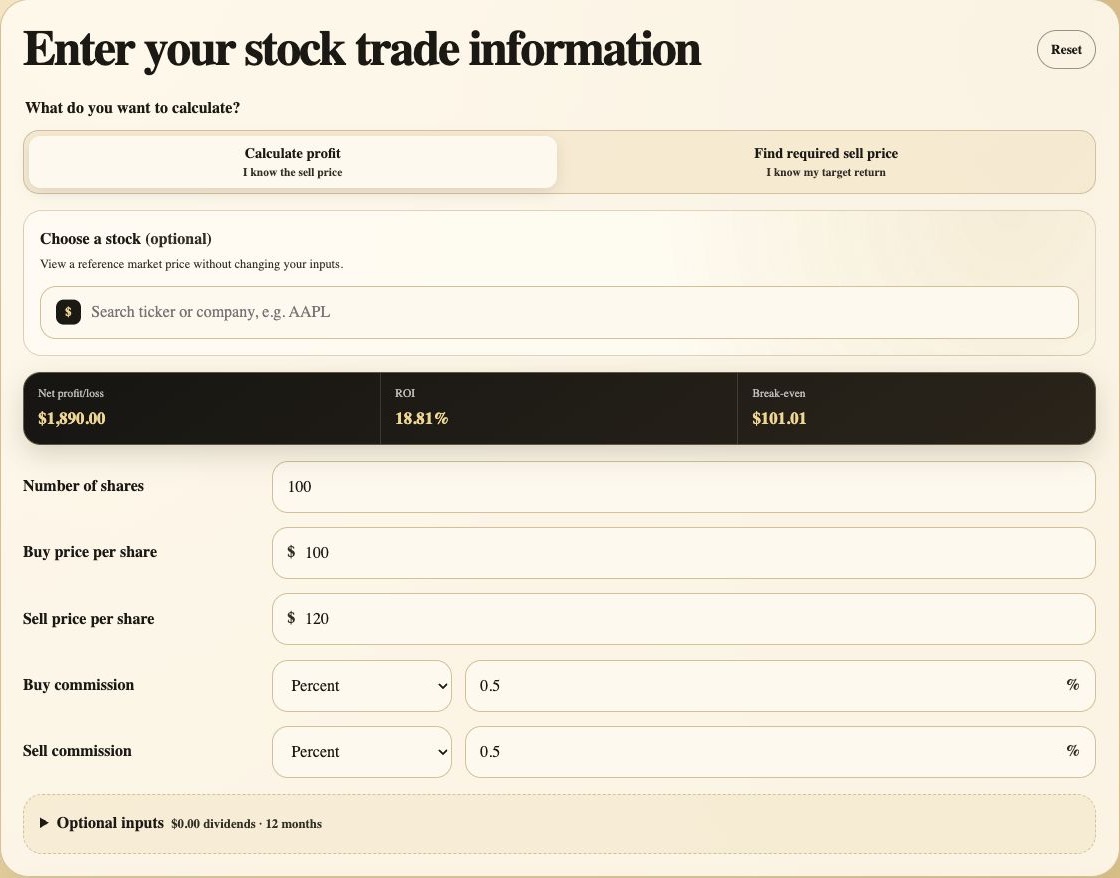
Confirm the calculation mode. Use Calculate profit when the sell price is known or when you want to test a possible exit price.
Check the live summary. Net profit, ROI, and break-even update whenever a price or commission changes.
Enter the buy commission. Choose Flat fee or Percent, then enter the amount charged for purchasing the shares.
Enter the sell commission. Use the fee expected at sale. It may be different from the buy-side fee.
Choose the correct input
Flat fee vs percentage commission
Match the calculator input to the way the broker states the charge. If there is no commission, keep the relevant value at zero rather than leaving an unknown fee out of the scenario.
Flat fee
Enter the fixed currency amount charged for the order. A $10 flat fee remains $10 whether the trade value is $1,000 or $10,000.
Percentage commission
Enter the percentage rate, not the calculated dollar fee. A value of 0.5 means 0.5%, so a $10,000 purchase produces a $50 buy commission.
Other transaction costs
If several known charges apply to one side of a trade, add them together and enter the combined amount as a flat fee. Keep a record of what the total contains.
Same trade, different costs
How commissions change stock profit and ROI
Consider 100 shares bought at $100 and sold at $120, with no dividends. The price movement creates a $2,000 gross gain in all three scenarios. Only the commission method changes.
| Commission scenario | Buy fee | Sell fee | Total fees | Net profit | ROI |
|---|---|---|---|---|---|
| No commissions | $0 | $0 | $0 | $2,000 | 20.00% |
| $10 flat fee each side | $10 | $10 | $20 | $1,980 | 19.78% |
| 0.5% each side | $50 | $60 | $110 | $1,890 | 18.81% |
Percentage-fee example
From transaction values to net profit
The buy commission is 0.5% of $10,000, or $50. The sell commission is 0.5% of $12,000, or $60. Because the two transaction values differ, the two percentage fees also differ.
- Purchase value
- 100 x $100 = $10,000
- Buy commission
- $10,000 x 0.5% = $50
- Total cost basis
- $10,000 + $50 = $10,050
- Gross sale value
- 100 x $120 = $12,000
- Sell commission
- $12,000 x 0.5% = $60
- Net proceeds
- $12,000 - $60 = $11,940
- Net profit
- $11,940 - $10,050 = $1,890
- ROI
- $1,890 / $10,050 = 18.81%
Result walkthrough
Verify where every commission appears
The result panel keeps the final outcome separate from the intermediate values. Open Calculation breakdown when you need to audit the buy fee, sell fee, Total fees, or values used in the formula.
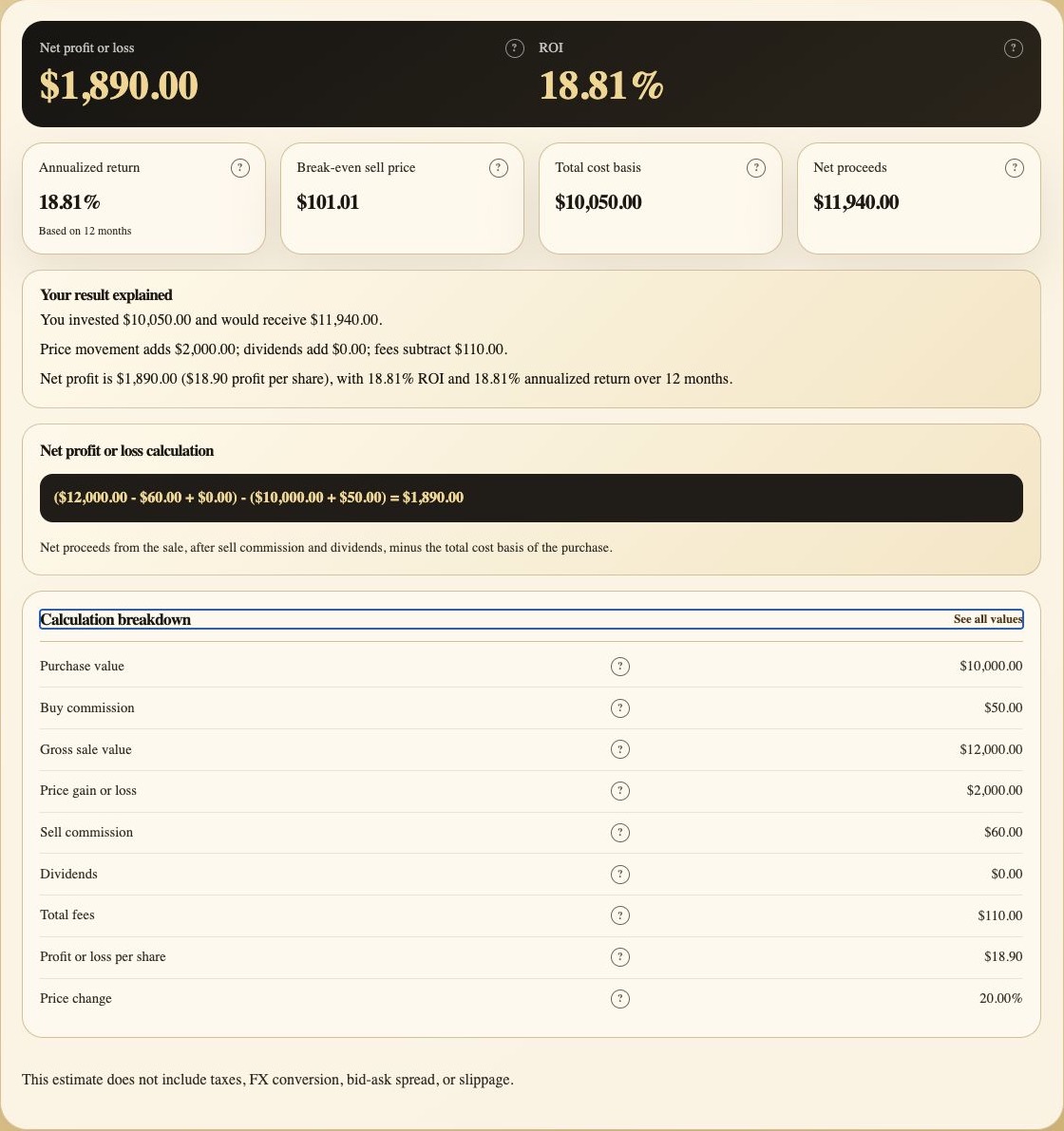
Read the headline result. Net profit is $1,890 and ROI is 18.81% after both commissions.
Compare basis and proceeds. Total cost basis includes the buy commission; Net proceeds exclude the sell commission.
Read the explanation. The summary separates the $2,000 price movement from the $110 reduction caused by fees.
Check the substituted formula. The displayed values show the fee deducted on each side of the calculation.
Audit Total fees. Calculation breakdown lists Buy commission, Sell commission, and their combined total.
Planning an exit
How fees affect break-even and a target sell price
Break-even is not simply the original buy price when fees are present. The sale has to recover the Purchase value, the buy commission, and the expected sell commission, after accounting for dividends. In the 0.5% example, the Break-even sell price is approximately $101.01 per share.
Break-even sell price
(Total cost basis - Dividends + Sell commission) / Shares
Break-even sell price
(Total cost basis - Dividends) / (Shares x (1 - fee rate))
Required sell price
(Total cost basis + Target profit - Dividends) / (Shares x (1 - fee rate))
For this trade, a $2,000 target profit and a 0.5% sell commission require a sell price of about $121.11 per share: ($10,050 + $2,000) / (100 x 0.995). Use Find required sell price in the calculator to solve the same question for your inputs, or read how to calculate a target sell price for the full target-return workflow.
In Profit at different sell prices, a percentage Sell commission is recalculated for every price scenario because the fee depends on Gross sale value. A flat Sell commission stays unchanged. Previous sales keep their own entered commissions and are deducted before the calculator determines the remaining position.
Before relying on the estimate
Fee checks and costs the calculator does not include
Enter the percentage as stated
Enter 0.5 for a 0.5% commission. Entering 50 would mean a 50% commission and produce a very different result.
Do not omit the purchase fee
The buy commission is part of the capital committed to the position. Leaving it out understates Total cost basis.
Use trade-specific costs
Avoid assigning a whole-account subscription or advisory fee to one trade unless that allocation is intentional and documented.
Account for costs outside this estimate
Taxes, currency conversion, bid-ask spread, slippage, margin interest, borrow fees, and changing regulatory charges are not calculated automatically.
Methodology and references
Why commissions belong in the calculation
Investor.gov explains that commissions may apply when an investor buys or sells securities. IRS guidance states that stock basis generally includes purchase costs such as commissions and that sale-related expenses reduce the amount realized. Those principles support the two-sided treatment of fees used by this calculator.
Ready to calculate profit after your trading costs?
Use the Stock Profit Calculator